Portfolio Value Tracking
Track your ETF holdings with real-time value calculations. Input your shares and see your total portfolio value instantly in your preferred currency.
Track Your Gerd Kommer ETF Investment with Professional Analytics
Track and analyze your Gerd Kommer ETF investment on iPhone, Apple Watch, and Mac with live prices, interactive historical charts, market sentiment indicators (CNN Fear & Greed Index, VIX, VVIX), an underwater (drawdown) chart, comprehensive statistics, and detailed holdings breakdown. iCloud keeps your data in sync across your devices. Support for both IE0001UQQ933 (Accumulating - WELT0A) and IE000FPWSL69 (Distributing - WELT0B) in multiple currencies.
Track your ETF holdings with real-time value calculations. Input your shares and see your total portfolio value instantly in your preferred currency.
Get current ETF prices from Yahoo Finance with one tap. Support for EUR, GBP, USD, CHF, and 6 more currencies. Prices update from the appropriate stock exchange.
View history with interactive charts in your selected currency. Multiple timeframes: 1M, 3M, 6M, 1Y, and All-time. Track performance with moving averages (MA38, MA100, MA50, MA200). All historical data available in all 10 supported currencies.
Deep dive into your investment with professional-grade analytics: CAGR, all-time highs/lows, median price, standard deviation, best/worst days, positive/negative day counts, and winning/losing streaks.
See how the market is feeling, right inside the app. The CNN Fear & Greed Index, VIX, and VVIX give you a quick read at the top of your Holdings and History screens. Tap any indicator for a one-year chart, period comparisons, and the components behind the score. A Home Screen and Lock Screen widget and an Apple Watch sentiment card with watch-face complication keep it at a glance — and a single switch in Settings turns it all on or off.
See exactly how far your ETF sits below its all-time high with an underwater (drawdown) chart, and gauge the depth and length of every dip. Drag across any chart to read the value on any single day.
See at a glance when the Gerd Kommer index rebalances next. It rebalances quarterly on the 9th trading day of January, April, July, and October — shown with a countdown as a strip on the Stocks tab and a detail card on the History tab. Show or hide it in Settings.
iCloud keeps your holdings and settings in sync across your iPhone, Apple Watch, and Mac. Set up your portfolio once and pick up right where you left off on every device — automatically and privately.
Full support for both Accumulating (WELT0A - IE0001UQQ933) and Distributing (WELT0B - IE000FPWSL69) versions. Easily switch between versions and compare historical performance.
Visualize your portfolio's geographical distribution with detailed country breakdowns. See exactly where your 4000+ holdings are allocated across global markets.
Understand your exposure across different sectors like Technology, Healthcare, Finance, and more. Make informed decisions about portfolio diversification.
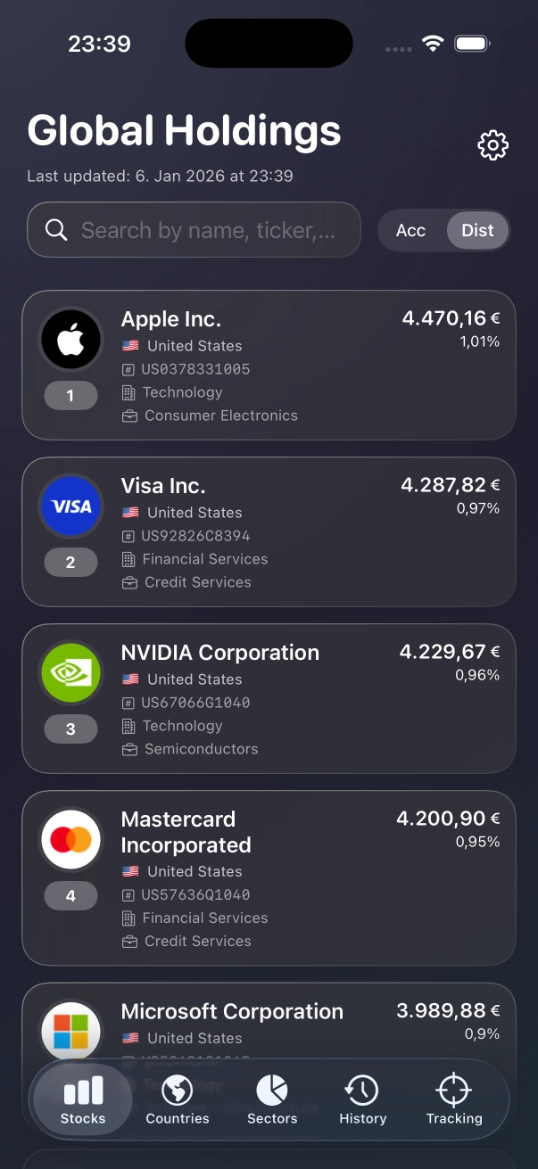
Search and filter all 4000+ individual stock holdings. Find specific companies, view their allocation percentages, sectors, and country origins.
Comprehensive support for 10 major currencies: USD, EUR, GBP, CHF, JPY, CAD, AUD, CNY, HKD, and SGD. All historical data pre-calculated for each currency ensuring accuracy. Switch currencies anytime and see instant updates.
Backup and restore your portfolio snapshots with ease. Export to JSON, CSV, or native Excel (.xlsx) formats for safekeeping or analysis in other tools. Import your saved data to sync across devices.
All calculations performed locally on your device. No personal financial information required or collected. Works offline after download.
Check the ETF’s daily change and your portfolio value at a glance with the Gerd Kommer Tracker Apple Watch app and complications. Add the figures you care about straight to your watch face and stay on top of your investment from your wrist.
Keep the ETF’s daily change and your portfolio value in view without opening the app. Add widgets to your iPhone Home Screen and Lock Screen, and to your Mac desktop, for a glanceable read on your investment.
Track your portfolio on the big screen with a fully native Mac app. A toolbar now shows your portfolio value, the current price, and the daily trend at a glance, and keyboard shortcuts speed up everything you do. Universal purchase — buy once, use on iPhone, Apple Watch, and Mac.
Gerd Kommer Tracker is fully localized in English, German, Spanish, French, Italian, and Portuguese. Every screen, chart label, and statistic appears in your language.
Gerd Kommer Tracker supports both versions: Accumulating (WELT0A - IE0001UQQ933) and Distributing (WELT0B - IE000FPWSL69). You can easily switch between them and compare their performance.
The app supports 10 major currencies: USD, EUR, GBP, CHF, JPY, CAD, AUD, CNY, HKD, and SGD. All historical data is pre-calculated for each currency to ensure accuracy.
Yes! All your portfolio configurations and calculations are stored locally on your device. We do not collect, transmit, or store any personal financial information on servers.
An internet connection is only needed to fetch live prices from Yahoo Finance. All historical data, statistics, and analyses work fully offline after downloading the app.
Holdings data is based on publicly available information and is updated regularly. You can fetch live prices manually at any time via the Settings.
Yes! You can export your portfolio snapshots in JSON, CSV, or Excel (.xlsx) format. This is useful for backups, device migration, or external analysis.
Yes! Gerd Kommer Tracker includes a native Apple Watch app with complications. See the ETF’s daily change, your portfolio value, and the market sentiment reading right on your watch face, and tap through to more detail in the watch app.
Gerd Kommer Tracker includes a Market Sentiment feature built around three widely followed indicators: the CNN Fear & Greed Index, the VIX (the market’s volatility index), and the VVIX (the volatility-of-volatility index). Tap any indicator for a one-year chart, period comparisons, and the components behind the score. Market Sentiment is also available as a Home Screen and Lock Screen widget and on Apple Watch — and you can turn the whole feature on or off in Settings.
Yes. iCloud keeps your holdings and settings in sync across your iPhone, Apple Watch, and Mac, so you can set up your portfolio once and pick up where you left off on any device. Syncing uses your private iCloud account — your data is never sent to our servers.
Track Your Gerd Kommer ETF Investment with Professional Analytics
For the latest features and detailed information, please visit the app on its store page.
Gerd Kommer Tracker is an independent analysis and portfolio tracking tool and is not affiliated with, endorsed by, or connected to L&G, Gerd Kommer, Yahoo Finance, or any other financial institution. This app is for informational and educational purposes only and does not constitute financial advice. Historical performance does not guarantee future results. Always consult with qualified financial professionals before making investment decisions.