Arcaria

Keep your bank and brokerage paperwork organized, searchable, and encrypted — offline

Arcaria is the private home for your bank and brokerage paperwork. Import your PDF statements and Arcaria keeps them organized, searchable, and encrypted — entirely on your own computer. It reads each PDF for you and fills in the date, amount, currency, bank, account or custody account, ISIN, and document type automatically. Many statements from banks and brokers across Europe and beyond (with the deepest coverage in Germany, Austria, and Switzerland) are recognized; anything it doesn’t catch, you complete in a few clicks. No account, no cloud, no tracking: your documents live in a single encrypted vault, with encrypted backups you restore in one step. The Arcaria app is available in English and German.

macOS Windows
Download on the Mac App StoreGet it from Microsoft Store
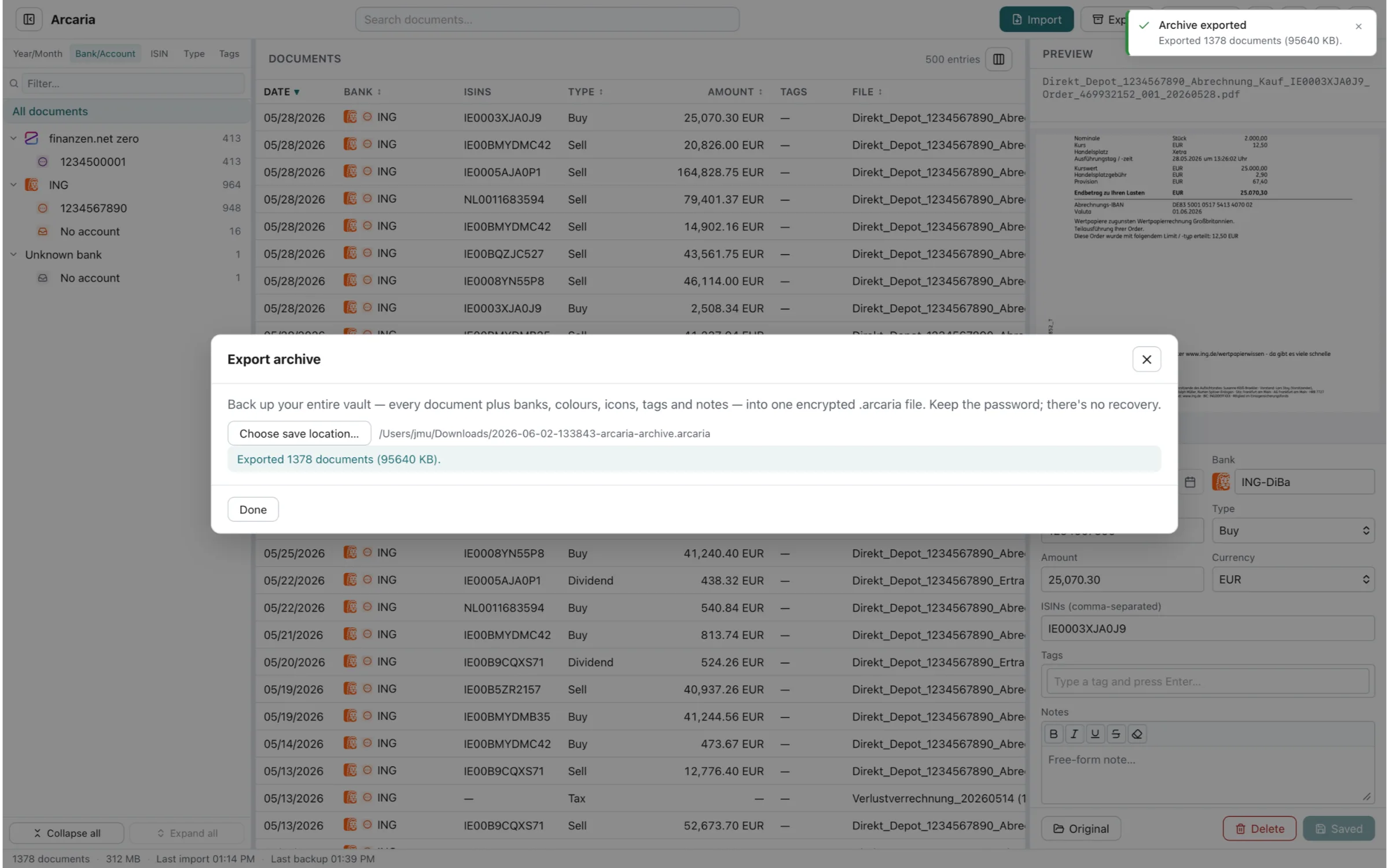
Arcaria on macOS in light mode — the document list with an encrypted archive backup being created
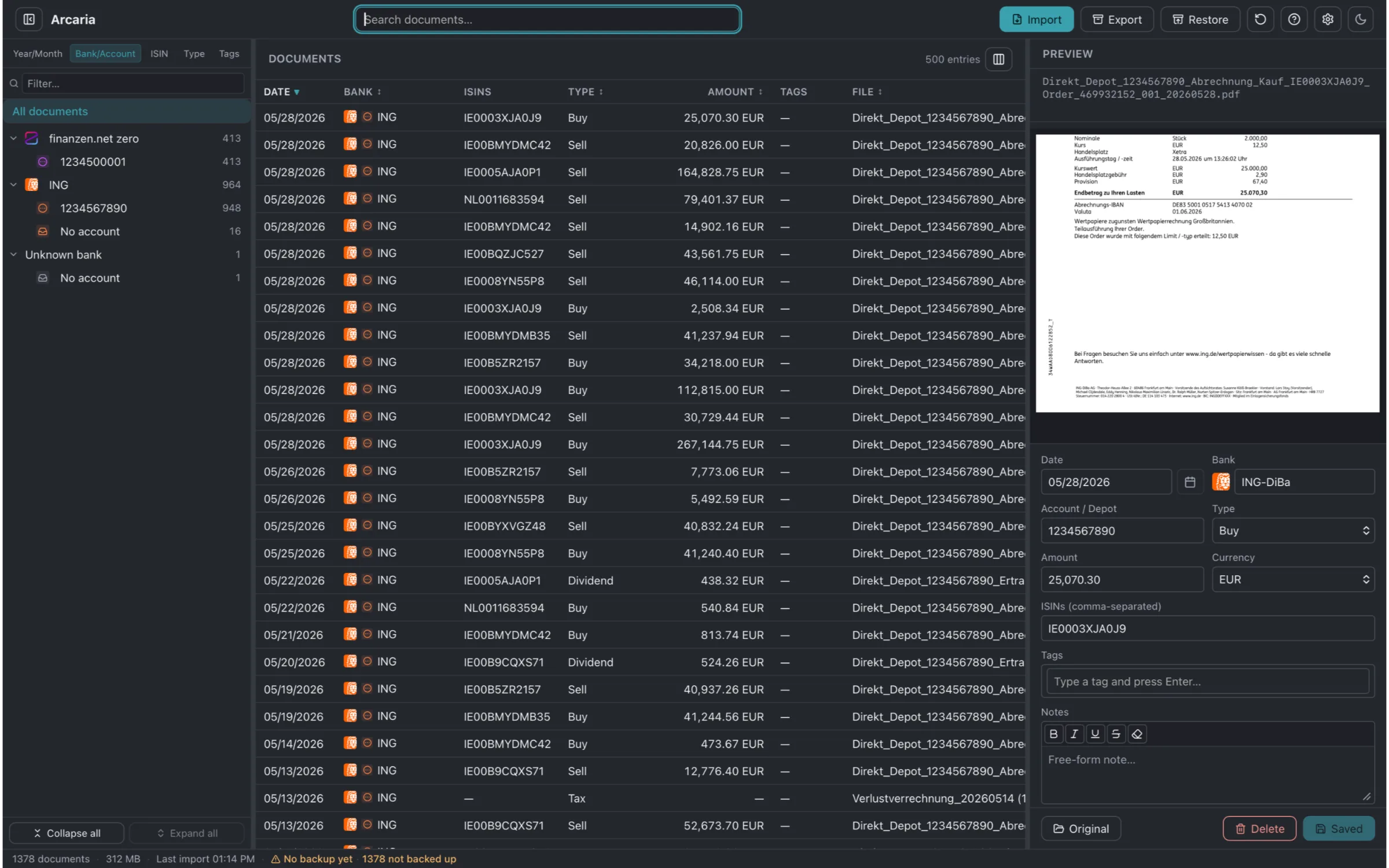
Arcaria on macOS in dark mode — a bank statement PDF shown beside its automatically extracted details

Features

Reads Your PDFs Automatically

Import a statement and Arcaria reads it for you, filling in the date, amount, currency, bank, account or custody account, ISIN, and document type. Buy and sell notes, dividend credits, tax documents, and account statements are all sorted into place.

One Encrypted Vault, Fully Offline

No account, no cloud, no tracking. All of your documents live in a single encrypted vault on your own computer, and Arcaria works completely offline. Nothing leaves your machine unless you choose to back it up or export it.

Encrypted Backups, One-Step Restore

Back up your entire vault to a single encrypted file, then restore it in one step on the same computer or a new one. Your archive of years of paperwork is never more than one backup away.

Find Anything Instantly

Full-text search runs across every document and every note you’ve added. Search by what a statement says, not just its file name — and jump straight to the right document among thousands.

Organized the Way You Think

Browse by year and month, by bank and account, or by ISIN and document type. Tag documents and add your own notes, and give each bank its own name and color so the whole archive reads at a glance.

Built for Investors

Buy, sell, dividend, and tax documents are filed automatically, so you can follow a position by its ISIN across banks and custody accounts. View the original PDF right beside the extracted details, or open it in your default app.

Screenshots

Supported banks & brokers

Arcaria reads statements from 127 banks and brokers across 21 countries — including ING-DiBa, Trade Republic, Comdirect, UBS, and Erste Bank — with the deepest coverage in Germany, Austria, and Switzerland.

See all 127 banks & brokers

FAQ

What does Arcaria do?

Arcaria is a private home for your bank and brokerage paperwork. You import your PDF statements, and Arcaria keeps them organized, searchable, and encrypted on your own computer. It reads each PDF and fills in the date, amount, currency, bank, account or custody account, ISIN, and document type for you.

Where are my documents stored?

In a single encrypted vault on your own computer. There is no account, no cloud, and no tracking, and Arcaria works completely offline. Your documents never leave your machine unless you choose to back them up or export them.

Which banks and brokers does Arcaria recognize?

Many statements from banks and brokers across Europe and beyond (with the deepest coverage in Germany, Austria, and Switzerland) are recognized automatically — buy and sell notes, dividend credits, tax documents, and account statements. When a statement isn’t detected automatically, you complete the details in a few clicks, and everything stays editable.

Does Arcaria connect to my bank?

No. Arcaria never connects to your bank, broker, or any online account. You import the PDF statements you already have, and Arcaria works only with those files on your own computer.

How are my documents protected?

Your documents are kept in a single encrypted vault, and backups are encrypted as well. Because there is no cloud and no account, the only copies of your archive are the ones on your computer and any backups you create yourself.

Can I search inside my documents?

Yes. Full-text search runs across every document and every note you add, so you can find a statement by what it says rather than just its file name. You can also sort and filter by year and month, bank and account, ISIN, or document type.

Which platforms and languages does Arcaria support?

Arcaria runs on macOS and Windows, available on the Mac App Store and the Microsoft Store. The app interface is available in English and German, with number and date formats matched to each language.

Is Arcaria investment advice?

No. Arcaria is a document organizer and personal archive that helps you keep your financial paperwork in order. It does not provide investment, financial, tax, or legal advice, and it does not connect to your bank.

Download Arcaria

Keep your bank and brokerage paperwork organized, searchable, and encrypted — offline

Download on the Mac App StoreGet it from Microsoft Store

For the latest features and detailed information, please visit the app on its store page.

Arcaria is a document organizer and personal archive that helps you keep your financial paperwork in order. It does not provide investment, financial, tax, or legal advice, and it does not connect to your bank.