Watch Face Complications
Add your portfolio performance to any watch face. Choose from corner, circular, rectangular, or inline complications showing your gain/loss, return percentage, and trend indicator.

Your Parqet portfolio, right on your wrist
PulseFolio brings your Parqet portfolio to your Apple Watch — at a glance, right on your watch face. Add corner, circular, rectangular, or inline complications showing your gain/loss, return percentage, and trend indicator. Switch between TTWROR and IZF/XIRR, pick your preferred time period, and let the complications refresh automatically during market hours. The companion iOS app connects securely via OAuth 2.0 with PKCE — PulseFolio never sees your Parqet password.
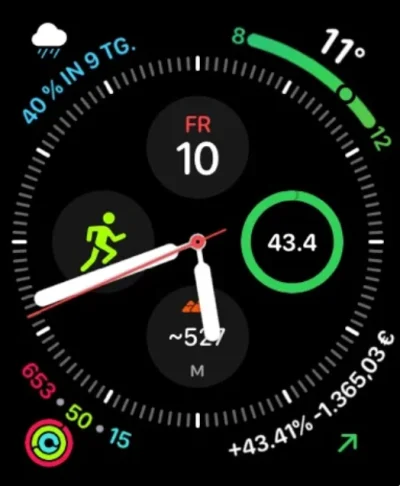
Add your portfolio performance to any watch face. Choose from corner, circular, rectangular, or inline complications showing your gain/loss, return percentage, and trend indicator.
Switch between TTWROR (True Time-Weighted Rate of Return) and IZF/XIRR (Internal Rate of Return) to see the metric that matters to you.
Connect your Parqet account on iPhone, select your portfolio, and configure the return metric and time period. Changes sync instantly to your Watch.
PulseFolio connects directly to the Parqet API through Parqet’s secure OAuth 2.0 flow — the app never sees your password. Credentials live in the iCloud Keychain on your devices.
Pick the time window that matches your style: 1D, 1W, MTD, 1M, 3M, 6M, 1Y, YTD, 3Y, 5Y, 10Y, or Max.
Complications refresh automatically every 15 minutes during market hours so your watch face always reflects the latest portfolio state.
Background refresh keeps complications up to date even when you’re not actively using the app — without draining your battery.
Authentication uses OAuth 2.0 with PKCE against the official Parqet API. Tokens are stored in the iCloud Keychain — never in plain text or on third-party servers.
PulseFolio displays your Parqet portfolio performance directly on your Apple Watch face as a complication. It shows portfolio value, absolute gain/loss, percentage return, and a trend indicator — refreshed automatically during market hours. A companion iOS app lets you select the portfolio, the return metric (TTWROR or IZF/XIRR), and the time period.
You need a Parqet account (parqet.com), an iPhone with iOS 17 or later, and an Apple Watch running watchOS 10 or later. The first-time setup happens in the iOS companion app, where you sign in to Parqet via OAuth and pick the portfolio to display.
PulseFolio uses OAuth 2.0 with PKCE to authenticate against the official Parqet API. Your password is entered directly on the Parqet login page — PulseFolio never sees it. Access and refresh tokens are stored in the iCloud Keychain on your own Apple devices. No credentials or portfolio data ever flow through our servers.
PulseFolio supports both TTWROR (True Time-Weighted Rate of Return) and IZF/XIRR (Internal Rate of Return). Time periods include 1D, 1W, MTD, 1M, 3M, 6M, 1Y, YTD, 3Y, 5Y, 10Y, and Max. The active metric and period are configured in the iOS companion app and sync to the Watch.
During market hours, complications refresh automatically every 15 minutes via background refresh. You can also pull-to-refresh inside the Watch app at any time to force an immediate update.
Currently, PulseFolio is available in English only. This marketing site, however, is fully bilingual in English and German.
Your Parqet portfolio, right on your wrist
For the latest features and detailed information, please visit the app on its store page.
PulseFolio is an independent companion app for Parqet accounts and is not affiliated with, endorsed by, or connected to Parqet GmbH. All portfolio data is retrieved from the official Parqet API on your behalf. PulseFolio does not provide investment, financial, tax, or legal advice. All figures are for informational purposes only. Past performance does not guarantee future results.