High-Performance Conversion
Quickly converts even very large CSV files into the Excel xlsx format. Enforces Excel row and column limits and handles BOM detection efficiently.

Convert CSV Files to Excel XLSX Format — Fast and Simple
csv2excel is a powerful tool to convert CSV files into the Excel xlsx format. It features smart type detection that automatically recognizes numbers, dates, and text — with full support for European number formats and multiple date styles. Add a bold header row with auto-filter, customize Excel header and tab colors, and edit metadata inline before exporting. A redesigned full-width interface with presets, a default output directory, and dark mode support makes conversion fast and effortless.
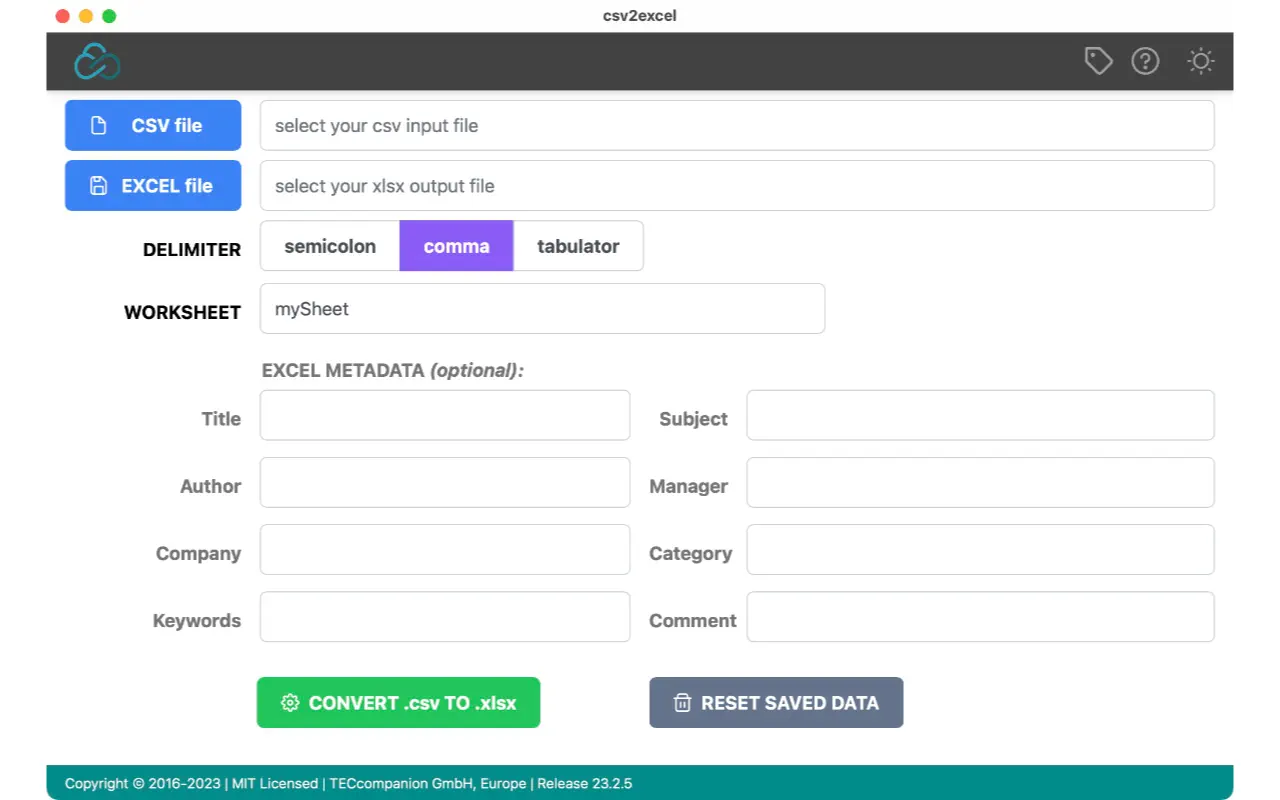
Quickly converts even very large CSV files into the Excel xlsx format. Enforces Excel row and column limits and handles BOM detection efficiently.
Automatically recognizes numbers, dates, and text in your CSV data. Leading zeros (ZIP codes, SKUs) are preserved as text, and large integers stay intact to prevent Excel precision loss. Toggle off for all-text import.
Supports comma-decimal numbers (e.g. 1.234,56) with a decimal style picker (Auto, Dot, Comma). Recognizes ISO, European (dd.MM.yyyy), US (MM/dd/yyyy), text-month, and time-only date formats. Invalid dates are safely kept as text.
Add a bold header row with Excel auto-filter dropdowns. Customize the header background color and worksheet tab color with built-in color pickers.
Edit metadata inline in a two-column grid — title, subject, author, manager, company, category, keywords, and comments. Save and load metadata presets, or let csv2excel auto-fill from the filename.
Set a persistent default output folder so the save panel always starts in the right place. Or use save-next-to-source to keep converted files alongside your CSVs.
Full dark mode support across all panels — including file picker, color picker, save panel, help window, and about window. Adapts to your system preferences.
A full-width responsive layout that scales with your window. Inline document properties, a prominent preset dropdown, compact options row, and quick re-convert with Cmd+R.
csv2excel converts CSV files into the Excel xlsx format with smart type detection, European number and date parsing, header row formatting, metadata editing, and customizable presets. It handles very large CSV files quickly and preserves data integrity for ZIP codes, large numbers, and special formats.
When enabled, csv2excel automatically detects whether each cell contains a number, date, or text and formats it accordingly in Excel. Leading zeros (like ZIP codes or SKUs) are preserved as text, and integers longer than 15 digits stay as text to prevent Excel precision loss. You can toggle smart detection off to import everything as plain text.
Yes. The decimal style picker lets you choose between Auto (infers from CSV delimiter), Dot (1,234.56), and Comma (1.234,56) formats. European comma-decimal values like 16,44 are correctly converted to numbers in Excel.
csv2excel detects ISO dates (2024-03-15), European dates (15.03.2024), US dates (03/15/2024), text-month dates (15-Mar-2024), time-only values (14:30:00), and two-digit years. Invalid dates like February 31 are safely kept as text.
csv2excel is available for macOS and can be installed directly from the Mac App Store.
Currently, csv2excel is available in English only.
Convert CSV Files to Excel XLSX Format — Fast and Simple
For the latest features and detailed information, please visit the app on its store page.
csv2excel is a utility tool for converting CSV files to Excel format. It is provided as-is without warranty. Always verify converted data for accuracy. The tool is not affiliated with Microsoft Excel or any CSV data provider.